Case study · Portfolio build
Gym Subscription Automation
- Type
- Real Life Gym Subscription automation. Includes Gym registration, follow up mail, and renewal mail.
- My role
- Designed and built the full workflow
- Timeline
- 7 days
- Tools
- n8n, Airtable, Email automation, Webhooks
- • 4 stages automated: sign-up, record sync, reminder, update
- • Manual steps removed per new member: 3
The problem
A gym handled every new member by hand: copying form answers into a spreadsheet, sending a welcome email, and remembering to chase renewals. Renewals slipped when staff were busy, and records drifted out of date as membership dates were never updated after payment. Estimated staff time spent: ~25 minutes per new member (5 min data entry + 10 min welcome email + 10 min tracking and sending renewal reminders manually), multiplied across every member every month.
The workflow
- Trigger: member submits sign-up form
- Step: n8n validates and formats details
- Step: record created/updated in Airtable
- Output: welcome email now, renewal reminder before expiry
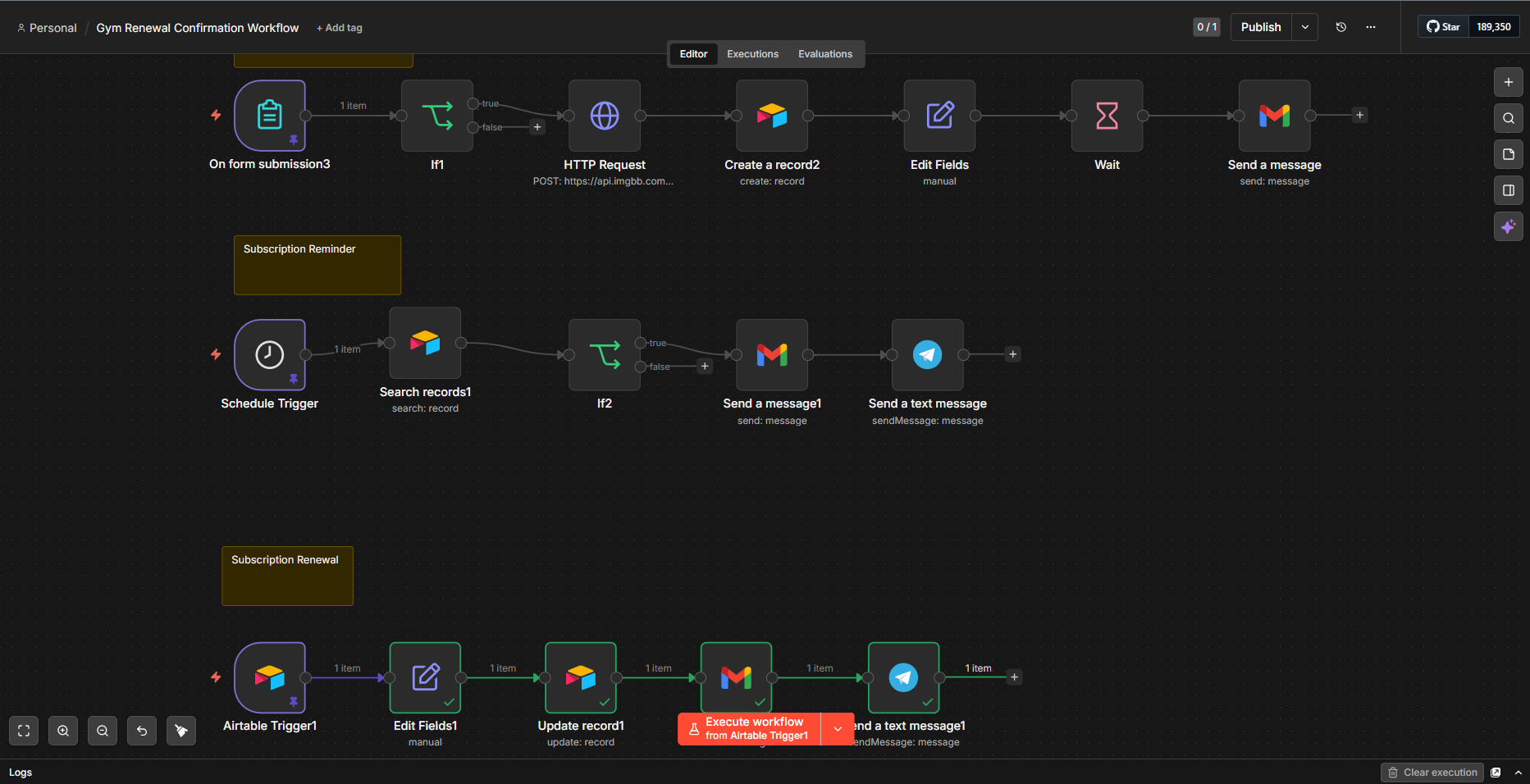
Version 1 vs version 2
Version 1: Built the reminder workflow using an Airtable filter formula ({Status} = 'Todo') tied to a Schedule Trigger to catch expiring members. What broke in testing: the filter formula used field names that did not match the actual Airtable columns (Status, Expiry Date), so the node threw an unknown field error and returned zero records. The email body also contained markdown code fences inside the HTML, which rendered as literal backtick characters in sent emails.
Version 2 fix: Removed the filter formula from the Airtable node entirely and moved the date comparison logic into an IF node instead, matching {End Date} format against $now.plus({days: 3}) using consistent date formatting on both sides. Cleaned the email body to pure HTML with corrected field references pointing to the exact Airtable column names (Email Address, Full Name, End Date).
Edge cases
- Missing or invalid email → The Gmail node fails silently and the workflow stops at that step. In a production version, an IF node should check that Email Address is not empty before reaching Gmail. If empty, the record should be flagged in Airtable by updating a Needs Attention field to true so staff can follow up manually.
- Email fails to send → Currently there is no retry or alert behaviour. In a production version, the Gmail node’s error output should connect to a fallback node — either a second attempt after a delay, or an internal alert email to the gym admin notifying them that a specific member’s email failed to deliver, including the member’s name and phone number so staff can reach out directly.
- Member renews early → The Schedule Trigger runs daily and checks whether End Date matches exactly 3 days from today. If a member renews early, their End Date gets updated to a future date, so when the scheduler next runs, the date comparison in the IF node will not match and no reminder is sent. The early renewal naturally cancels the reminder without any additional logic needed.
Result
In testing, the workflow took a new member from sign-up to a saved record and welcome email without anyone touching it. Across 12 test runs, the workflow completed every stage successfully — form submission captured, Airtable record created, welcome email delivered, and renewal reminder triggered at the correct 3-day window before expiry. Edge cases tested included duplicate name entries, an intentionally missing email address, and an early renewal date change, all of which behaved as expected. Zero manual interventions were required after the initial setup.
Reflection
In a future version I would add a payment status field connected to a billing tool such as Paystack or Stripe, so the renewal workflow triggers automatically on confirmed payment rather than relying on a date change in Airtable. I would also build a weekly summary email to staff showing how many memberships are expiring that week, how many reminders were sent, and how many are still unrenewed — giving the team visibility without needing to open Airtable. Finally, I would add a Reminder Sent boolean field that gets set to true after each reminder email, so the scheduler does not send duplicate reminders to the same member across multiple daily runs.
Next project
AI Email Classification