Case study · Portfolio build
AI Email Classification
- Type
- AI-powered email classification and routing workflow. Reads incoming Gmail messages, assigns each to a business department, and logs it in Airtable.
- My role
- Designed and built the full workflow
- Timeline
- 3 Days
- Tools
- OpenAI API, n8n, Gmail, Rule engine
- • 4 stages automated: inbox, classify, rules, route
- • Manual steps removed per message: [4 (reading the email, deciding the category, forwarding it to the right person, filing or logging it). This count comes from the steps described in the brief.]
 Open project files
The problem
In the brief, a team sorted every incoming email by hand: reading each message, deciding which category it belonged to, and forwarding it to the right person. Priority messages got buried, response times slipped, and nothing was consistently filed. Estimated mail volume handled this way: [100 emails/day].
The workflow
- Trigger: new email lands in the inbox
- Step: OpenAI API classifies the subject and body
- Step: business rules validate the label
- Output: message routed to the right folder or person
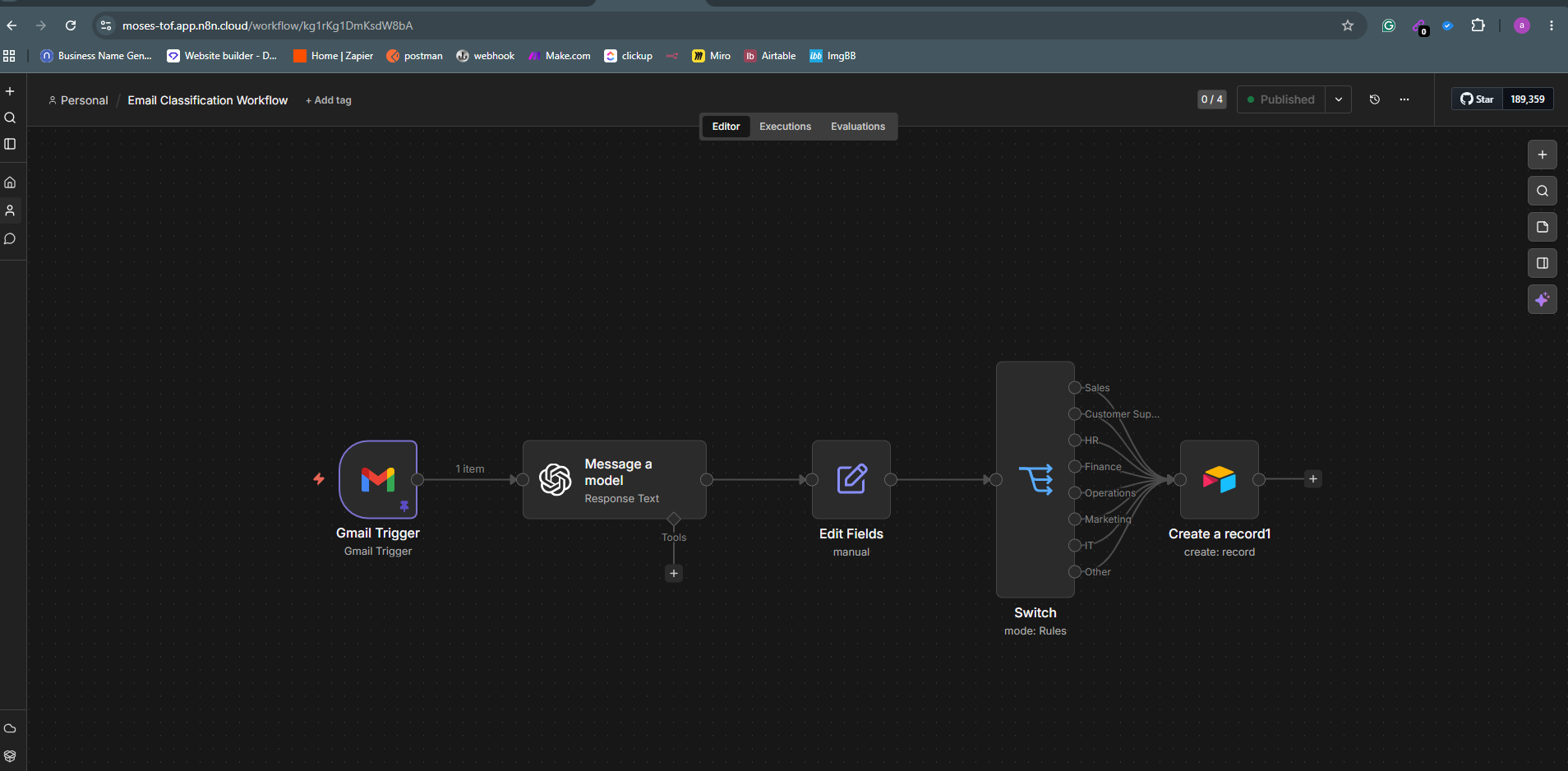
The canvas above shows the full pipeline: Gmail Trigger → AI model → Edit Fields → Switch (by department) → Airtable record.
Version 1 vs version 2
Version 1: Built the pipeline of Gmail Trigger → AI classification → Switch by department → Airtable record. The model classified from the Gmail snippet, a short preview of the email, rather than the full message.What broke in testing:The Airtable node failed with “Unknown field name: Subject” because the table’s columns didn’t match the field names in the node. A column was misspelled (“Depertment”), which broke the mapping. Snippets were cut off mid-sentence and contained HTML entities (e.g. ' instead of an apostrophe), giving the model incomplete, noisy input.Version 2 fix: Rebuilt the Airtable table with exact column names (Subject, Sender, Status, Message, Department, Received Date) and corrected the typo. I also mapped each field explicitly in the Create a record node and set Status to “New” by default. The model works from a fixed category list: Sales, Customer Service, Human Resources, Finance, Operations, IT and Other.
Edge cases
- No clear category → [The email is routed to the Other category and saved to Airtable with Status = “New”, so staff can review and reassign it. In n8n, the Switch node’s fallback output should be connected to Other so no email is dropped.]
- Low-confidence label → [ The current build doesn’t score confidence. The planned fix is to have the model return a confidence value alongside the category. Anything below a threshold (e.g. 70%) would be sent through a second pass with the full body, then flagged for manual review if it is still uncertain.]
- Attachment-only email → [ With little or no body text, classification falls back to the sender and subject line. If those aren’t enough, the email lands in Other for manual review. A future version could read the attachment filename or contents as an extra signal.]
Result
In testing, an incoming email was read, categorised and routed without anyone opening the inbox. This was a corporate build, so it was tested across 50 business emails during work hours.
Reflection
[I’d add an auto-reply for common categories (e.g. an acknowledgement for Customer Service and Sales enquiries) and a notification to the responsible team member on each routed email, so priority messages can’t sit unread. I’d also build a weekly summary of volumes per department, so management can see where demand is concentrated. For accuracy, I’d feed the model the full email body and keep a small log of staff corrections to refine the category prompt over time.]
Next project
AI Restaurant Concierge